Plugs into how
you already ship.
Builds arrive from TestFlight or CI. Results go to GitHub, Slack, your coding agent or any endpoint you choose.
Webhooks
Notify any endpoint the moment a run finishes.
MCP server
Let your coding agent write tests and fix failures.
GitHub
Push builds from Actions and get results as PR checks.
Slack
Suite summaries in a channel, single tests by DM.
TestFlight
Test every iOS build as soon as you ship it.
CLI, API keys and the upload API
Push builds from any CI system.
Issue trackers (Jira, Linear and others)
Route failures into Jira, Linear or anything else.
Webhooks
Notify any endpoint the moment a run finishes.
Semaloop sends a signed webhook, delivered by Svix, the moment a test run reaches a terminal status — success, failure or error. The event type is test_run.status_changed.v1, and the payload carries the app, test, build and test run IDs, a link to the run, and the failure or error reason, so your tooling can open a ticket, page someone or hand the failure to a coding agent.
Settings → Webhooks → Set up webhooks. The webhook portal lets you add endpoint URLs, choose the events each endpoint receives, inspect every delivery and its response, and replay failed deliveries. Read the docs.
{
  "type": "test_run.status_changed.v1",
  "appId": "uk_example_app",
  "data": {
    "previousStatus": "pending",
    "nextStatus": "failure",
    "testRunId": "a379af73-217d-464b-b4ee-266b63a1f48d",
    "url": "https://app.semaloop.com/app/uk_example_app/run/a379af73…",
    "failureReason": "Tapping 'Sign in' showed an error"
  }
}
Does Semaloop support webhooks?
Yes. Semaloop sends an outbound webhook, test_run.status_changed.v1, whenever a test run reaches success, failure or error. Deliveries are signed, and can be inspected and replayed from the webhook portal. Setup and the full payload are in the webhooks documentation.
Can I get a webhook only when a test fails?
Yes. Add a Svix transformation to the endpoint in the webhook portal that cancels any delivery whose nextStatus is not failure. Non-failures are then never sent to that endpoint.
How do I verify that a webhook came from Semaloop?
Every endpoint has a signing secret, shown in the webhook portal. Verify the svix-signature header against it before trusting a request, either with a Svix SDK or by checking the signature by hand.
Will a retried run send more than one webhook?
No. When Semaloop retries a run automatically, only the final attempt sends an event. Each event's id is stable per run and status, so you can safely deduplicate on it.
MCP server
Let your coding agent write tests and fix failures.
A remote MCP server lets a coding agent do anything the dashboard can: discover apps, builds and tests, create and revise tests from a natural language description, trigger and cancel runs, pull the root-cause analysis, video, network logs and system logs behind a result, track recurring issues, and manage secrets and custom tools.
Settings → MCP. Interactive agents connect to https://mcp.semaloop.com/mcp over Streamable HTTP and sign in with OAuth 2.1. CI and headless agents connect to https://mcp.semaloop.com/mcp/key with an API key instead. Read the docs.
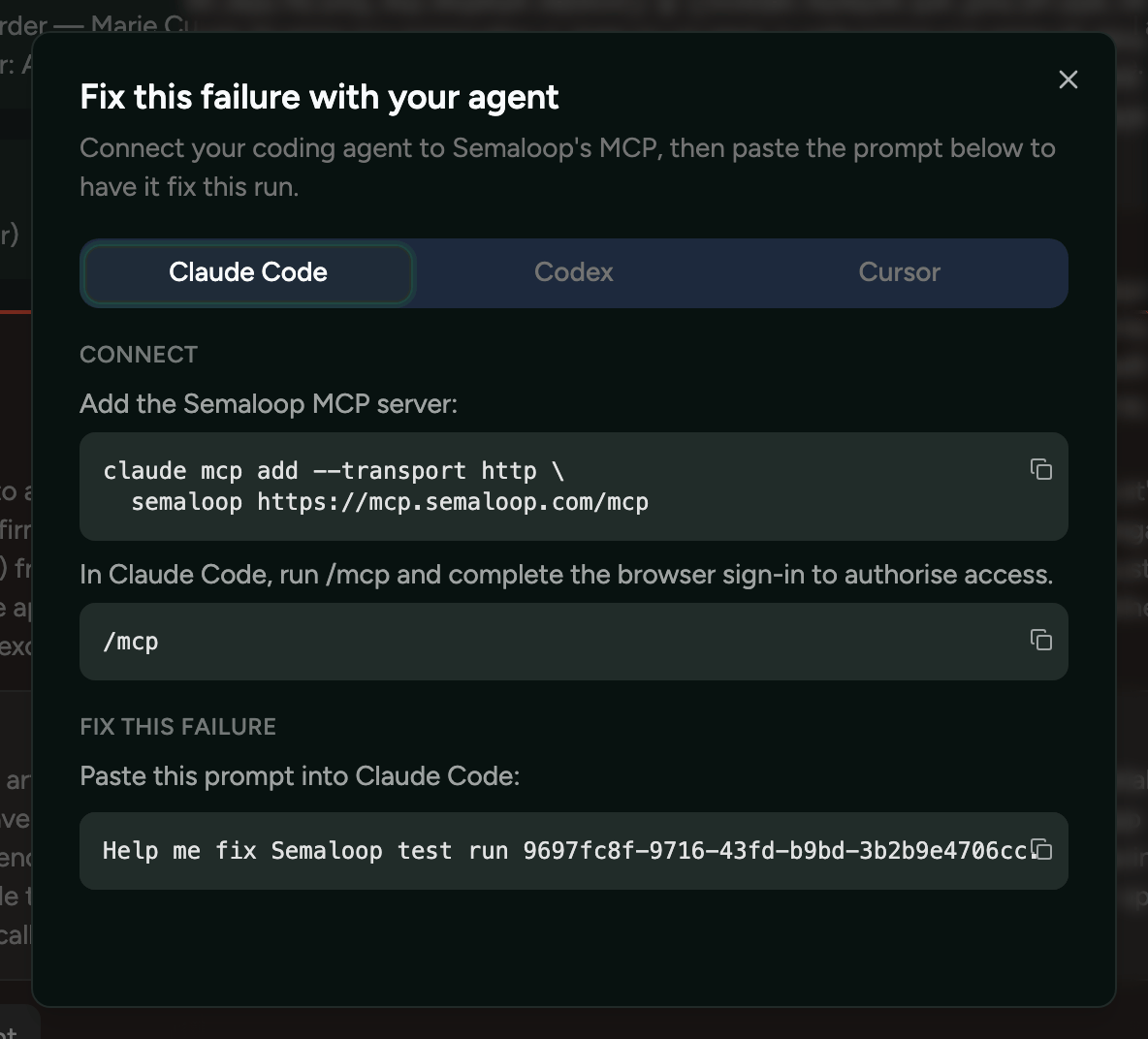
Does Semaloop have an MCP server?
Yes. The Semaloop MCP server runs at https://mcp.semaloop.com/mcp over Streamable HTTP, with OAuth 2.1 sign-in, so any MCP client that supports remote servers can connect to it. Setup is in the MCP server documentation.
Can a coding agent write and update Semaloop tests?
Yes. Over the MCP server an agent can list your existing tests, compare them with a pull request, and write a new test from a natural language description of the flow. When a run fails it can pull the video, network logs and system logs, decide whether the app or the test is at fault, and fix the code or revise the test in the same session.
Can I use the MCP server from CI, without signing in?
Yes. CI and headless agents connect to https://mcp.semaloop.com/mcp/key with a Semaloop API key as a bearer token. It is the same server with the same tools; the key is confined to the single app it was created for and carries write access.
What can a read-only user do over MCP?
Every member of an organisation can read apps, builds, tests, runs, issues, signals and run artefacts. Creating or updating tests, secrets and custom tools, and triggering or cancelling runs, needs the write or admin organisation role.
GitHub
Push builds from Actions and get results as PR checks.
A native GitHub Action, semaloop/cli/actions/build-push@v1, pushes your build to Semaloop when you cut a release — a .app or .ipa for iOS, or a standalone .apk for Android. When builds arrive this way, the results of the tests run against them are reported back to the pull request as checks.
Settings → GitHub integration to connect the repository, then add the build-push action to a workflow with a Semaloop API key stored as a repository secret. Read the docs.
- uses: semaloop/cli/actions/build-push@v1
  with:
    path: build/YourApp.app
    api-key: ${{ secrets.SEMALOOP_API_KEY }}
Does Semaloop have a GitHub Action?
Yes. semaloop/cli/actions/build-push@v1 pushes an iOS .app or .ipa, or an Android .apk, to Semaloop from a GitHub workflow. It takes the artefact path and a Semaloop API key, and works out the repository, commit and ref for you.
Can Semaloop report test results as checks on a pull request?
Yes, when builds reach Semaloop through the GitHub Action or the CLI and the repository is connected in Settings → GitHub integration. Builds that arrive from TestFlight are not tied to a commit, so they do not produce pull request checks.
Does Semaloop work with GitLab, Bitbucket, Bitrise, CircleCI or Xcode Cloud?
Yes for pushing builds: the Semaloop CLI, or three calls to the upload API, push a build from any CI system that can run a command. Reporting results back as pull request checks is GitHub-only today; on other systems, use a webhook to post results wherever you need them.
Slack
Suite summaries in a channel, single tests by DM.
A channel of your choice gets a summary whenever a full test suite run completes on a new build, and the message updates in place, rather than posting again, when a result changes because its test spec was edited. Anyone can also subscribe to a single test and get its outcome as a direct message.
Settings → Slack integration, then choose the channel that should receive suite summaries. Read the docs.
Does Semaloop integrate with Slack?
Yes. Semaloop posts a summary to a channel of your choice whenever a full test suite run completes on a new build, and you can subscribe to an individual test to get its result as a direct message. Manual reruns do not post a channel summary.
Does Semaloop integrate with Microsoft Teams?
Not natively. To get results into Teams, send Semaloop's webhook to a Teams workflow or another automation tool, and use a transformation in the webhook portal to filter to failures or reshape the message.
TestFlight
Test every iOS build as soon as you ship it.
On iOS, Semaloop picks up every new build straight from TestFlight, with nothing to trigger by hand. It supports an external group by public link, an external group by email invite, and internal testing. TestFlight builds run on real iPhones.
Give Semaloop your public TestFlight link, or add the agent email addresses Semaloop provides to your external or internal TestFlight group. Read the docs.
Does Semaloop integrate with TestFlight?
Yes, and it is the most common way to connect an iOS app. Semaloop joins your external group through a public link or an email invite, or your internal group, then picks up and tests each new build as you ship it.
Can I use Semaloop without TestFlight?
Yes. Push a build with the CLI, the GitHub Action or the upload API instead: a .app runs on an iOS simulator, and a .ipa signed with Semaloop's device IDs runs on a real iPhone.
Does Semaloop integrate with Google Play?
No. There is no Play Console integration: Android apps connect by pushing a single installable .apk from CI. App bundles (.aab), XAPK or APK-set containers, and split APKs are not accepted.
CLI, API keys and the upload API
Push builds from any CI system.
The Semaloop CLI, in early access, pushes builds from the command line or any CI system, and can tag a build with its repository, commit and ref so results come back as pull request checks. It installs with Homebrew or as a downloaded binary, and authenticates with an API key created in Settings → API keys. The same key calls the upload API directly and connects CI to the MCP server.
Settings → API keys → Manage keys to create a key, which is scoped to one app. Install the CLI with brew tap semaloop/tap and brew install semaloop, then run semaloop build push. Read the docs.
brew tap semaloop/tap
brew install semaloop
export SEMALOOP_API_KEY=…
semaloop build push build/YourApp.app
Can I trigger Semaloop from my CI pipeline?
Yes. Pushing a build from CI with the CLI, the GitHub Action or the upload API runs every active test against it automatically. To run only selected tests against a specific build, call the test_runs_trigger tool on the MCP server's API-key endpoint from the same pipeline.
Does Semaloop have a REST API?
Yes, for getting builds in: POST /api/v1/uploads, a PUT of the artefact to the returned URL, then POST /api/v1/uploads/finalize, authenticated with an API key as a bearer token and described in the OpenAPI specification. Everything else — tests, runs, results, issues, secrets and custom tools — is available programmatically through the MCP server.
Is there a Semaloop CLI?
Yes, in early access. semaloop build push sends a .app, .ipa or .apk to Semaloop, and its --git-repo, --git-commit and --git-ref flags let results be reported back to GitHub. The source and releases are at github.com/semaloop/cli.
Issue trackers (Jira, Linear and others)
Route failures into Jira, Linear or anything else.
Semaloop has no built-in Jira or Linear integration. Teams route failures and recurring issues into their tracker in one of two ways: a webhook that opens a ticket when a run fails, or a coding agent connected to both the Semaloop MCP server and the tracker, which pulls Semaloop's issues and files them with whatever other context you have.
Point a webhook endpoint at a small handler or automation that creates the ticket, or connect your coding agent to the Semaloop MCP server alongside your tracker's own MCP server. Read the docs.
// Webhook portal → endpoint → Advanced → Transformation
function handler(webhook) {
  if (webhook.payload.data.nextStatus !== "failure") {
    webhook.cancel = true;
  }
  return webhook;
}
Does Semaloop integrate with Jira or Linear?
Not natively. A webhook can open a ticket the moment a run fails, since the payload carries the failure reason and a link to the run. Alternatively, a coding agent connected to the Semaloop MCP server and to your tracker can pull Semaloop's recurring issues and file them for you.
Can Semaloop page our on-call engineer when a test fails?
Yes, through a webhook. Send test_run.status_changed.v1 to your paging tool's inbound webhook, with a transformation in the portal so only failures are delivered.
See it against your own app
Every integration is also documented in the Semaloop docs. For what Semaloop is and how a test runs, see what Semaloop is.