 RoryRory Smith·Co-founder & CTONov 12, 2025November 12, 2025
Finding the Nano Banana
RoryRory Smith·Co-founder & CTONov 12, 2025November 12, 2025
You and I can use a smartphone intuitively, tapping and swiping away to our heart's content. But how can we let computers do the same thing, operating apps and devices on our behalf?
In the world of computer-use, there are two popular approaches to understanding and interacting with what's on screen:
- Parse the DOM on web + accessibility trees on mobile and send them to an LLM to reason about. Then use the bounding boxes of elements to determine where on the screen to tap.
- Or, rely purely on pixels and vision-capable models.
Option #1 works great when the data is available, but often it's not. On mobile, poor accessibility labels and busy view hierarchies mean they're frequently not an option. And who knows, will the 'next smartphone' even provide those same developer interfaces?
On the other hand option #2 re-uses the same interfaces that are built for humans. It's a safe bet that screens, speakers and microphones will still be around in 10 years time (unless Neuralink's telepathy goes mainstream!).
But relying on pixels isn't all roses — it also creates a tricky requirement: computers need be able to visually locate and interact with precise areas of a screen.
Ask and ye shall not always get
In the backdrop of all the AI buzz, that sounds easy, right? Just ask an AI model for coordinates, and click.
It turns out, that's harder than it looks.
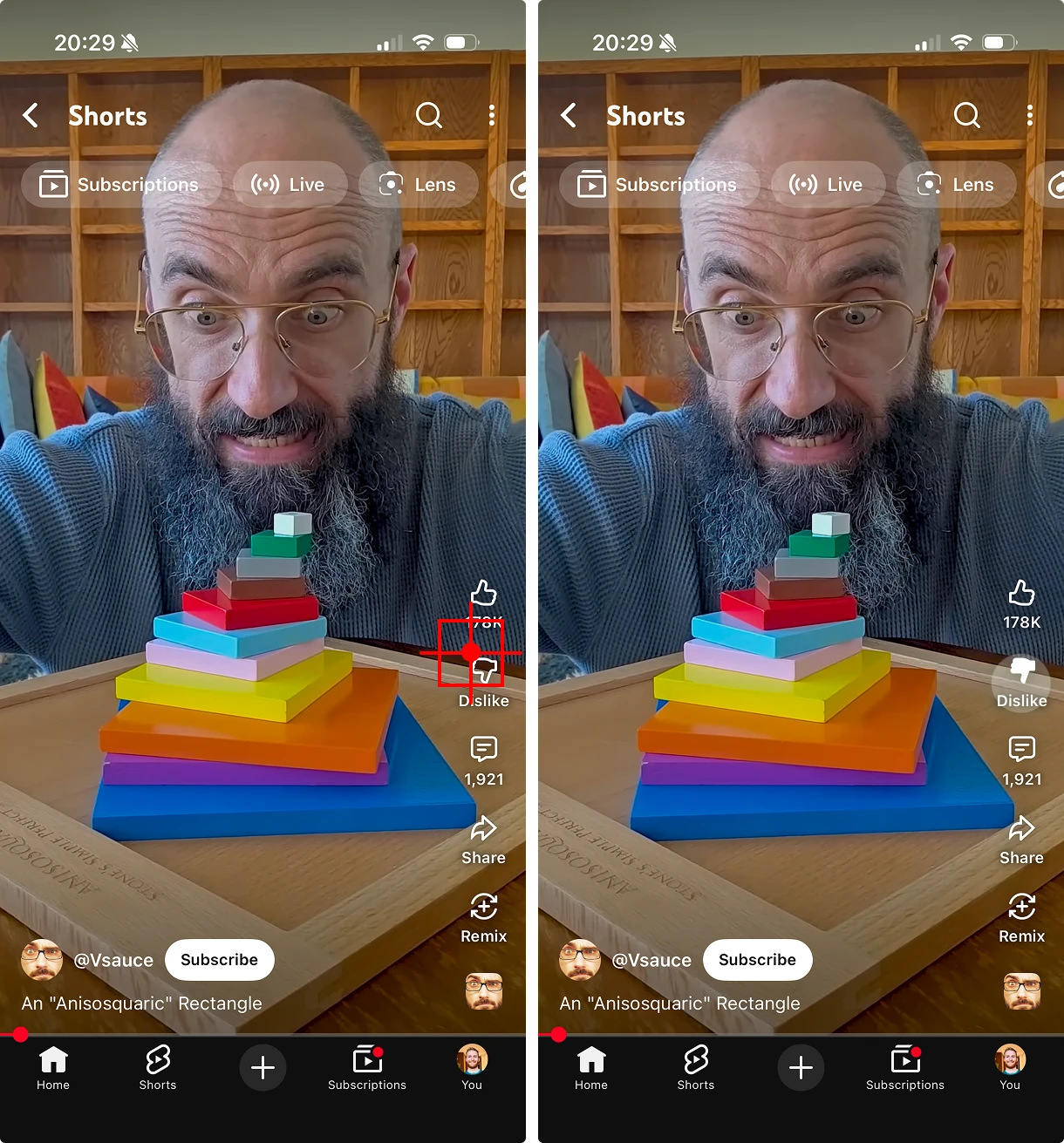
Gemini, Claude and GPT can all describe what they see on a screen. They can tell you that there's an edit button in the corner, but as soon as you ask for coordinates to interact with it, they start to crumble.
Sometimes the coordinates are ever so slightly off the mark, and often times they're in a wildly different part of the screen. The agent believes it clicked on the right element, so when the app fails to respond because the button was never actually tapped, the agent thinks the app has malfunctioned.
Some models, like Gemini, explicitly advertise "coordinate reasoning". They can point at things in images, and they do a better job than most, but better isn't the same as reliable. For automated testing, we need pixel-level accuracy. 'Close' isn't good enough when a 10-pixel miss can mean tapping the wrong control.
Blame the training data
The problem comes down to the training data being fed to these models. Models trained on 'pointing' tasks are rare, because that kind of data is expensive to collect.
The Allen Institute for AI made real progress here with their Molmo model, where they used clever tricks like speech-based descriptions to collect higher-quality labelled pointing data.
On Android, this sort of data can be gathered relatively easily, which is why Google are at the front of the pack with their Gemini pointing models. On iOS, it's much harder to capture the same data due to Apple's tightly controlled public API.
At Semaloop, each of our test run traces help close that gap, but in the meantime, we wanted to see if there was another way to achieve accurate spatial understanding, without retraining a model from scratch.
Image generation models
While coordinate-trained models are still scarce, there's been an explosion of image generation models this year. Google's Nano Banana excels at making fine-grained changes to images — the kind of pixel-accurate manipulation that used to require Photoshop and the patience of a saint.
I haven't seen the training data, but I would assume it's roughly something like this:
(original image, prompt, output image)
…repeated hundreds of thousands of times.
That means that the model has been explicitly trained to connect text prompts with specific regions of images to change. It's developed a complex latent space that fuses text and vision representations, giving it an intuitive sense of where words apply within an image.
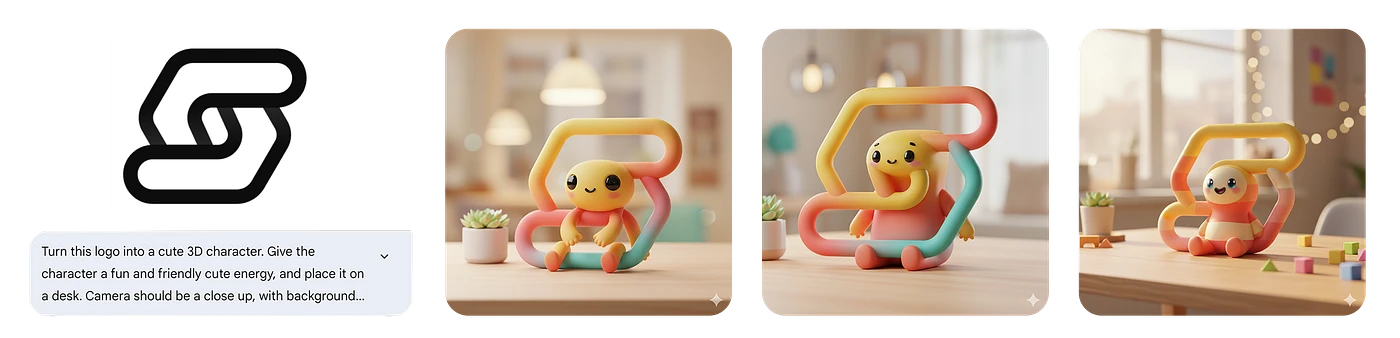
We already know that frontier vision models can describe elements in an image as text, and we now have a way of going from text back to an image.
But what good is that? It might look like we've gone full circle, but with a bit of creativity, we can extract coordinates.
Coordinate smuggling
The key lies in understanding the strengths of each model, and how they can be used to go from our inputs to our outputs:
- We start with a goal like 'add money to the bank account' and a device screenshot.
- Vision models can understand the contents of the screenshot, and reason about what they need to do to achieve the goal: "I need to tap the add money button". But they can't ground the tap in coordinate space.
- Image generation models can locate a description of an element in an image: "draw a box around the add money button". But they only output images, not coordinates.
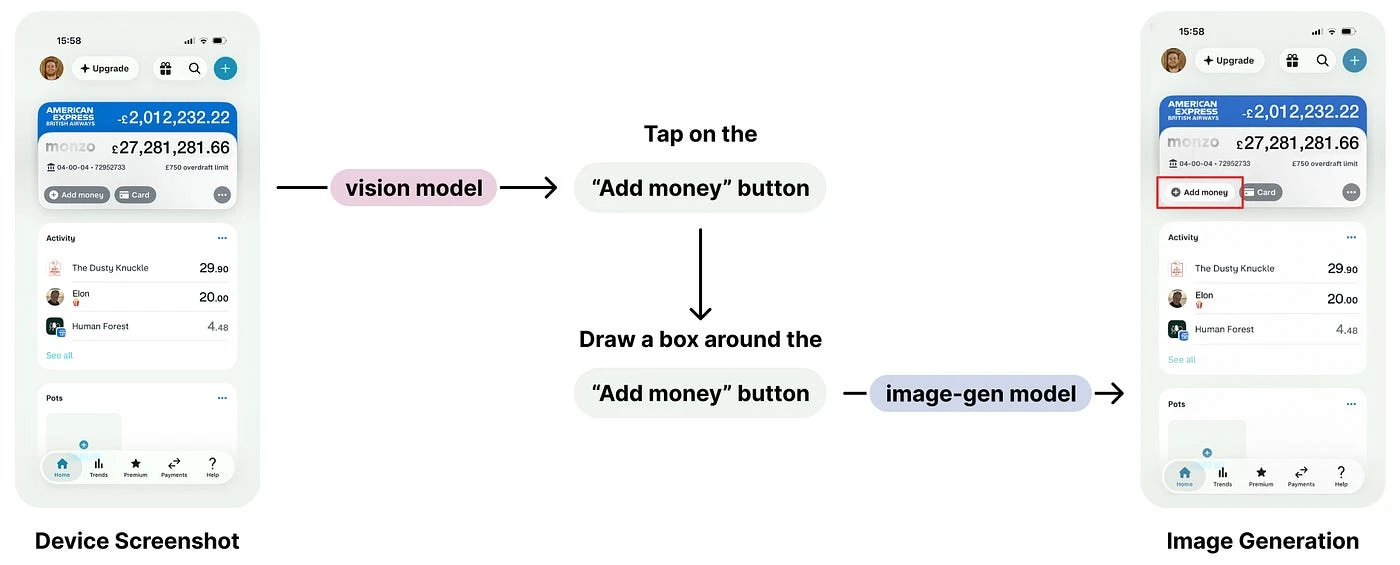
Stacking models like this gets us all the way from our inputs, to an image with a bounding box around the target element, but not quite coordinates.
To get the coordinates, we need to smuggle them through the colour channels — which is where our coordinate smuggling trick comes in.
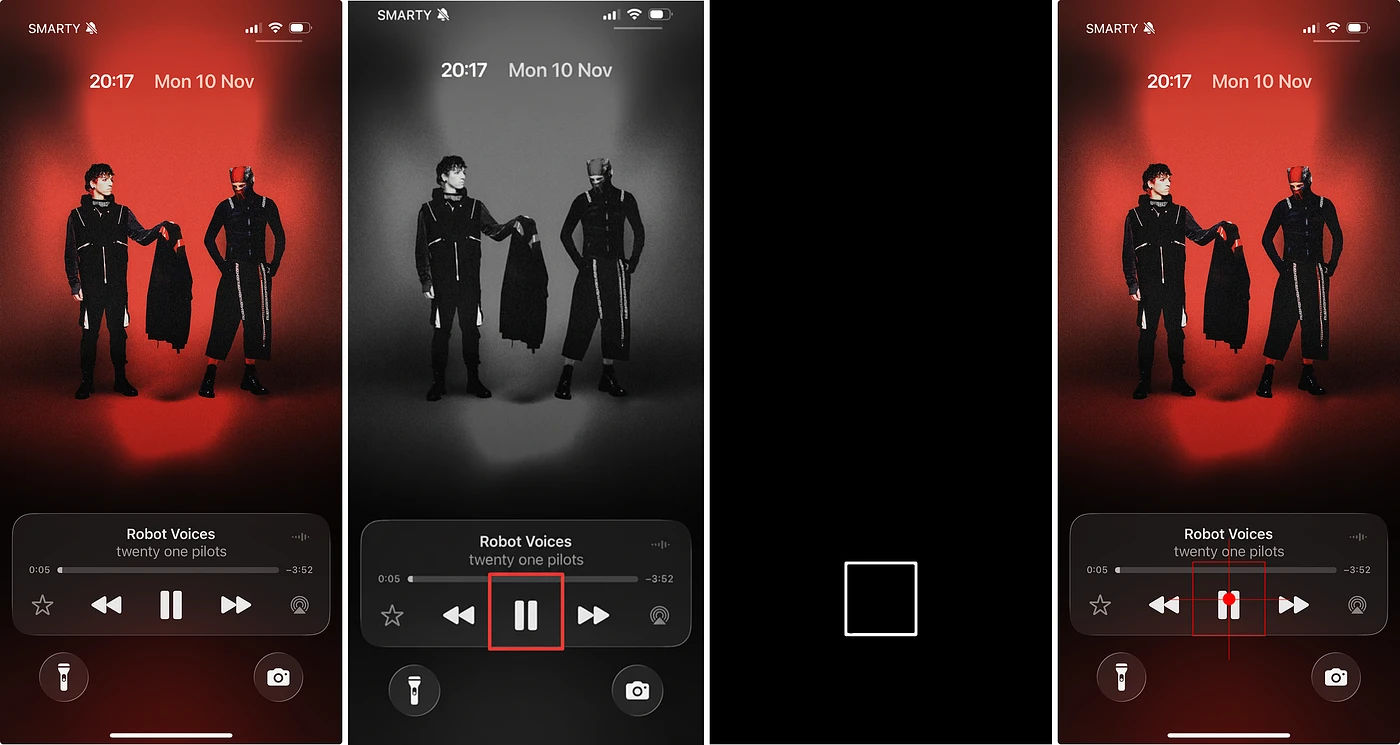
We ask Nano Banana to make a change that affects only the region it associates with our described element. To make it robust across backgrounds and colours, we convert the original image to grayscale first and instruct the model to modify only the red colour channel. Assuming it follows our prompt faithfully, we can then measure the red channel's intensity to find the modified pixels, and compute a bounding box for that region.
What emerges is a clean, structured representation of the model's spatial understanding.
Is it a hack? Absolutely.
But it's a hack that helped lift our pointing accuracy from 74% to 98% in internal evals.
This is our banana bread & butter
This technique is just one layer in Semaloop's broader architecture. It sits alongside other vision-capable models and heuristics that make our testing agents more accurate and resilient than a single research lab can hope to achieve.
At Semaloop, we're on a mission to help teams spot bugs in their apps before their users do. That means using computers to autonomously interact with mobile apps. Not just simulate touches, but actually see and understand what's happening on-screen.
Rather than interact with accessibility trees or view hierarchies, we've made the deliberate architectural decision for our agents to perceive the world like humans do, through sight, sound and touch. That means hard technical challenges now, but a platform built for the future.
If that's the kind of work that excites you — building agents that truly see and understand the world — we're hiring a founding engineer! Come help us push the limits of autonomous testing at Semaloop!
RoryRory Smith·Co-founder & CTO·Nov 12, 2025November 12, 2025